

Anthropic Launches Claude For Small Business
Anthropic launched Claude for Small Business with 15 workflows and 8 connectors. Here’s where to start, what Claude can touch, and how to roll it out without handing your ops stack a chainsaw.

TL;DR
Anthropic launched Claude for Small Business on May 13, 2026, packaging Claude Cowork with 15 ready-to-run agentic workflows, 15 reusable skills, and connectors to QuickBooks, PayPal, HubSpot, Canva, DocuSign, Google Workspace, Microsoft 365, and Slack. This is not a new chatbot tier. It is Anthropic’s move to make Claude an operating layer inside the tools small businesses already use. Claude reads, drafts, reconciles information across apps, and waits for approval before sending anything. This article includes a decision tree for choosing your first workflow, a trust-boundary table showing what Claude can and cannot touch, a connector-permission map, a workflow-by-business-pain table, and a practical rollout plan for weeks one through four.
Anthropic launched Claude for Small Business on May 13, 2026, and arrived with the subtlety of a moving truck: Claude Cowork, 15 agentic workflows, 15 reusable skills, and connectors to QuickBooks, PayPal, HubSpot, Canva, DocuSign, Google Workspace, Microsoft 365, and Slack.
That’s Anthropic’s move to make Claude an operating layer inside the tools small businesses already use.
Every launch article I read lists the 15 workflows.
But the SMB owners I talk to usually ask a more practical question when they experiment with agentic workflows: Where do I even start?
I suspect they’ll ask the same thing when they hear about this announcement too.
This article gives you a decision tree for picking your first workflow, a trust-boundary table for what Claude can and cannot touch, a connector-permission map for the scary bits, and a four-week rollout plan that starts with read-only workflows instead of handing an AI the keys to your company.

Hey, I’m Karo Zieminski 🤗
AI Product Manager and builder.
I write Product with Attitude, an AI newsletter for thousands of subscribers developing critical AI literacy the only way it sticks: through practice.
We don’t just use AI. We build workflows, automations, and products with it, while studying how AI itself is built, positioned, and woven into our work.
If you’re new here, welcome! Here’s what you might have missed:

What’s Inside
What Anthropic Launched
Claude for Small Business launched on May 13, 2026.
The official framing is simple: Claude for Small Business packages connectors and agentic workflows to move Claude from “helpful AI assistant” into “the thing running inside your business tools.”
The better framing is even simpler: Claude is trying to become the workflow layer between the small-business owner and the apps already running the company.
The package has three main components.
Connector And Permission Map
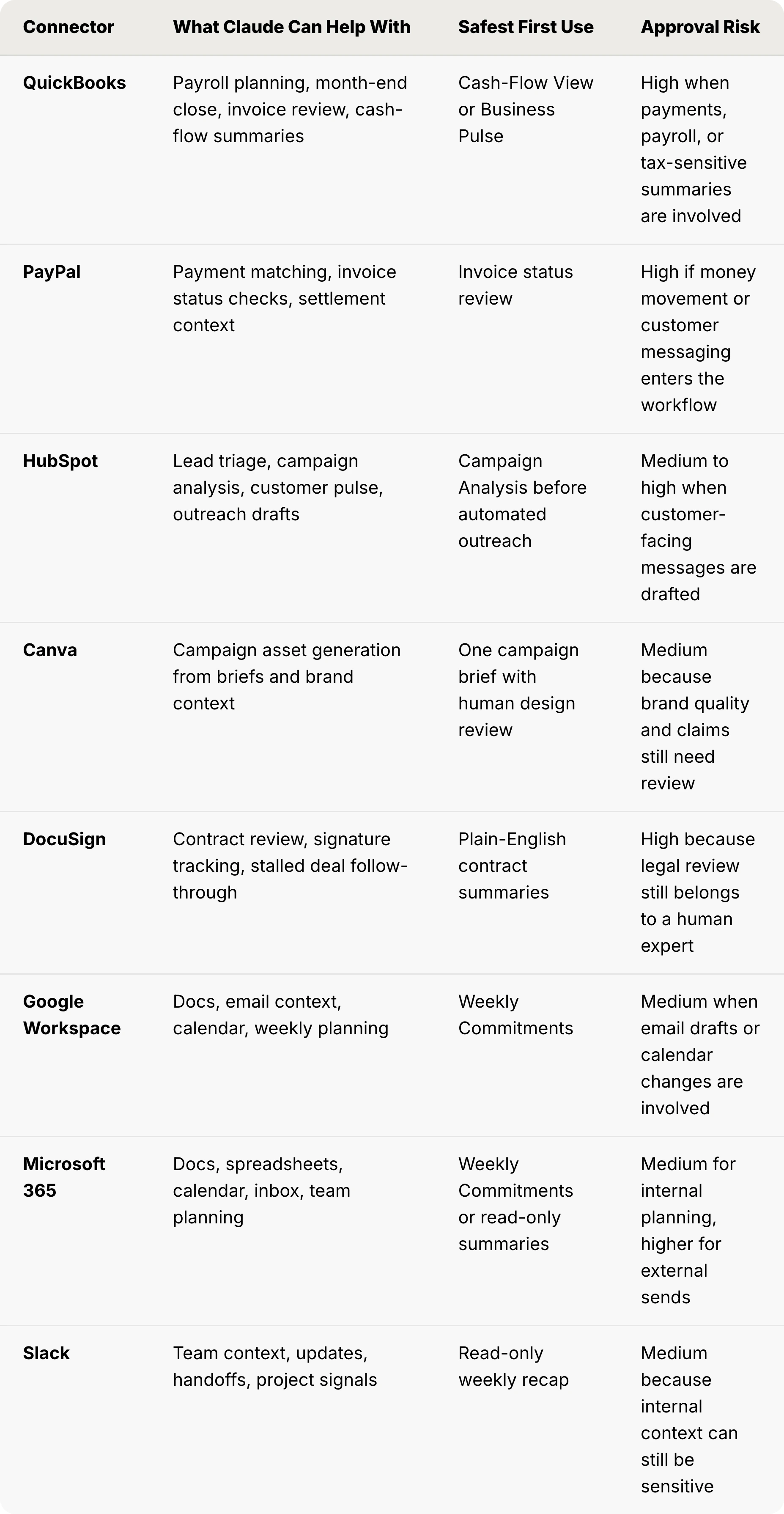
The launch includes eight named integrations: Intuit QuickBooks, PayPal, HubSpot, Canva, DocuSign, Google Workspace, Microsoft 365, and Slack.
Each connector links Claude Cowork to a live data source.
Claude can read, draft, and sometimes act inside these tools, depending on the workflow and the approval settings we choose.
That is where responsible automation starts. Reading data is not the same as sending a payment, emailing a customer, or posting campaign assets. Small business owners should treat those as different risk levels.
Workflows
Claude for Small Business includes 15 ready-to-run agentic workflows for the tasks small businesses consistently hate: payroll planning, month-end close, invoice chasing, lead triage, contract review, campaign creation, cash-flow monitoring, and business pulse reporting.
They are structured task sequences with defined inputs, actions, and approval points. That makes them closer to packaged operating workflows than one-off prompts. Very similar to Perplexity workflows.
Skills
The package also includes 15 reusable skills built around repeatable business tasks.
Skills are the reusable capability layer inside Claude Cowork: once configured, they run the same logic every time without making you rebuild the whole thing from scratch.
The whole thing runs through Claude Cowork, which is Anthropic’s agentic workspace product.
If you haven’t set up Claude Cowork yet, read this before anything else in this guide.

What Claude For Small Business Is Not
It’s not a standalone SMB app, not a replacement for QuickBooks, not an autonomous CFO or CMO. Claude doesn't decide things for your business. It reads, drafts, surfaces, and waits. You approve.
According to Anthropic’s own description, users must initiate tasks and approve sensitive actions before Claude sends, posts, or pays. Existing permissions carry through the connectors, so Claude can’t access data we can’t access.
I like that.
I also wouldn’t rely on instinct here. The operating rule should be written down: read-only first, draft-only second, approval-gated actions third, and anything involving money, legal risk, or external communication last.
The Workflow Map
We’re watching Anthropic build the model that makes Claude Cowork function like an SMB operating system, one connector and one workflow at a time.
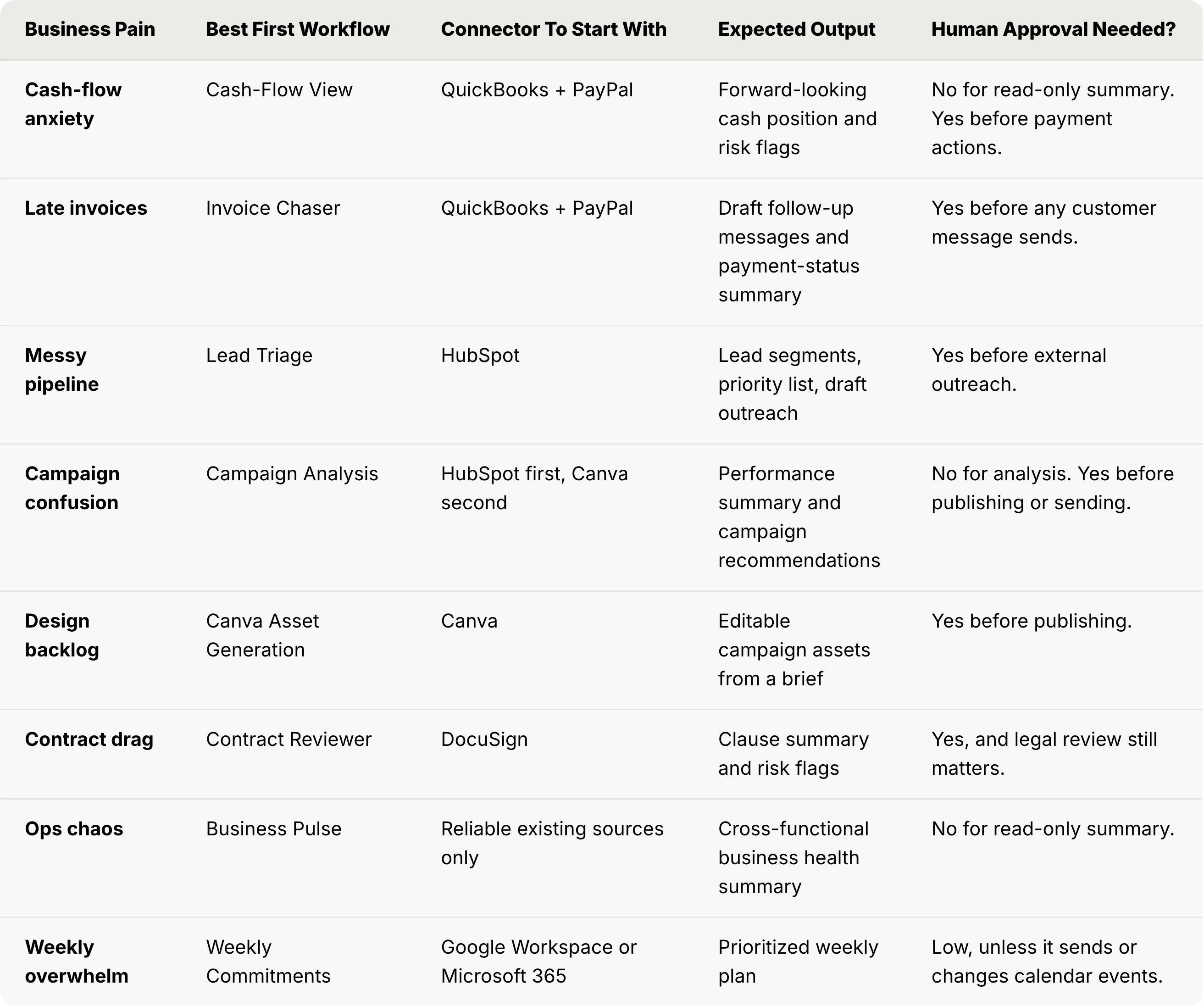
But small-business owners don’t buy workflow categories. They buy relief from specific pain.
So here is the map by pain, not by vendor slide.
Finance Workflows
Payroll planning
Claude reads QuickBooks payroll data, surfaces discrepancies, drafts the payment plan for approval. No payroll runs without human sign-off.
Month-end close
Claude pulls transaction data from QuickBooks and PayPal, flags reconciliation items, drafts the close summary. Cuts the accountant-prep time, not the accountant.
Cash-flow view
Claude reads account balances and upcoming obligations, generates a forward-looking cash position. Answers “do I have money for that?” without a spreadsheet session.
Invoice chaser
Claude reads open invoices from QuickBooks, checks payment status against PayPal settlements, drafts follow-up messages. You approve before anything sends.
Margin analyzer
Claude reads revenue and cost data, surfaces margin by product or service line. Most small business owners don’t know their actual margins. That is the problem. Margin confusion can hide the fact that the business is working hard and earning badly. This workflow changes that.
Tax-season organizer
Claude pulls categorized expenses, flags unusual items, drafts the summary your accountant wants. Lina Ochman, who leads SMB product at Anthropic, described this workflow category as addressing the most time-intensive recurring burden for small business owners.
Sales and marketing workflows
Lead triage
Claude reads HubSpot CRM data, scores and segments leads, and drafts outreach sequences for review.
Campaign analysis
Claude reads HubSpot campaign data, then generates attribution summaries and conversion breakdowns.
Canva asset generation
This workflow deserves a little context.
Canva exceeded $500M in B2B revenue and partnered with Anthropic specifically to build this workflow.
You give Claude the campaign brief. Canva generates fully editable, on-brand assets.
For a solo founder with no design budget, this may be the highest-leverage creative workflow in the bundle.
The order has to be deliberate here too: analyze the campaign first, then generate assets. Otherwise we are just making prettier guesses. Very on-brand. Still guesses.
Content strategist
Claude reads your existing content and business context, then drafts a content calendar and topic recommendations.
Customer pulse
Claude reads HubSpot contact and deal data, surfaces trends in customer activity, flags at-risk accounts.
Ops and Legal Workflows
Contract reviewer
Claude reads documents through the DocuSign integration, flags clauses by risk level, and drafts a plain-English summary for the business owner.
Note: This isn’t positioned as legal advice, but as a first-pass filter before the attorney reviews.
Business pulse
Claude pulls data across connected sources, generates a cross-functional business health summary. One of the safest “week one” workflows because it’s read-only and has no write risk.
Weekly commitments
Claude reads task and calendar data from Google Workspace and Microsoft 365, and drafts a prioritized weekly plan.
This workflow has the lowest switching cost of any in the package. That makes it boring, and boring lets people trust the system.
DocuSign follow-through
Claude tracks document status, chases signatures, surfaces stalled contracts. Anyone who has lost a deal because a contract sat in someone’s inbox for two weeks will understand why this exists.
Where to Start: A Decision Tree
This is the sequencing advice I didn’t see in launch coverage from TechCrunch, Axios, and Fast Company, or anyone else on my reading list.
Start here before connecting everything. Seriously.
“Connect all the apps and see what happens” is a terrible deployment strategy. That’s how businesses create mystery processes nobody can debug.
If your primary pain is revenue slump: Start with Campaign Analysis and Lead Triage. These are the fastest workflows for understanding what is working in your pipeline and where the drop-off is. Connect HubSpot. Don’t add Canva until you understand the data.
If your primary pain is cash flow: Start with Invoice Chaser paired with Cash-Flow View. Both are read-heavy with minimal write actions, and both produce immediate visibility into where your money is stuck. Connect QuickBooks and PayPal. Run in approval-required mode.
If your primary pain is ops chaos: Start with Business Pulse and Weekly Commitments. Business Pulse is read-only across all connected sources. Weekly Commitments is low-risk, low-stakes, and builds the habit of using Claude inside your daily flow.
If your primary pain is legal bottlenecks: Start with Contract Reviewer and DocuSign Follow-Through. Low action risk, high visibility value. Connect DocuSign and run contract review on your top three recurring contract types.
If your data is messy: Don’t connect QuickBooks yet. Messy data doesn’t become clean data when you add AI access. It becomes messy data with an audience. Clean the source first. Business Pulse on reliable data is better than Margin Analyzer on questionable data.
If your team is skeptical, start with Weekly Commitments. It fixes a real planning problem without making anyone sit through a sermon on “the future of work.”

The Trust Boundary
Anthropic confirms it doesn’t train on Team and Enterprise customer data by default. This trust model isn’t blind faith in the vendor, but a specific permission architecture you configure and control.
It’s also the most important thing in this article for a small business owner considering deployment. Print it, pin it, share it with your team.
Claude for Small Business operates on a permission model where existing user permissions carry through connectors. Claude can’t touch what you can’t touch in the source system. Every sensitive action requires approval before it executes.
Here is the trust boundary I would use internally.
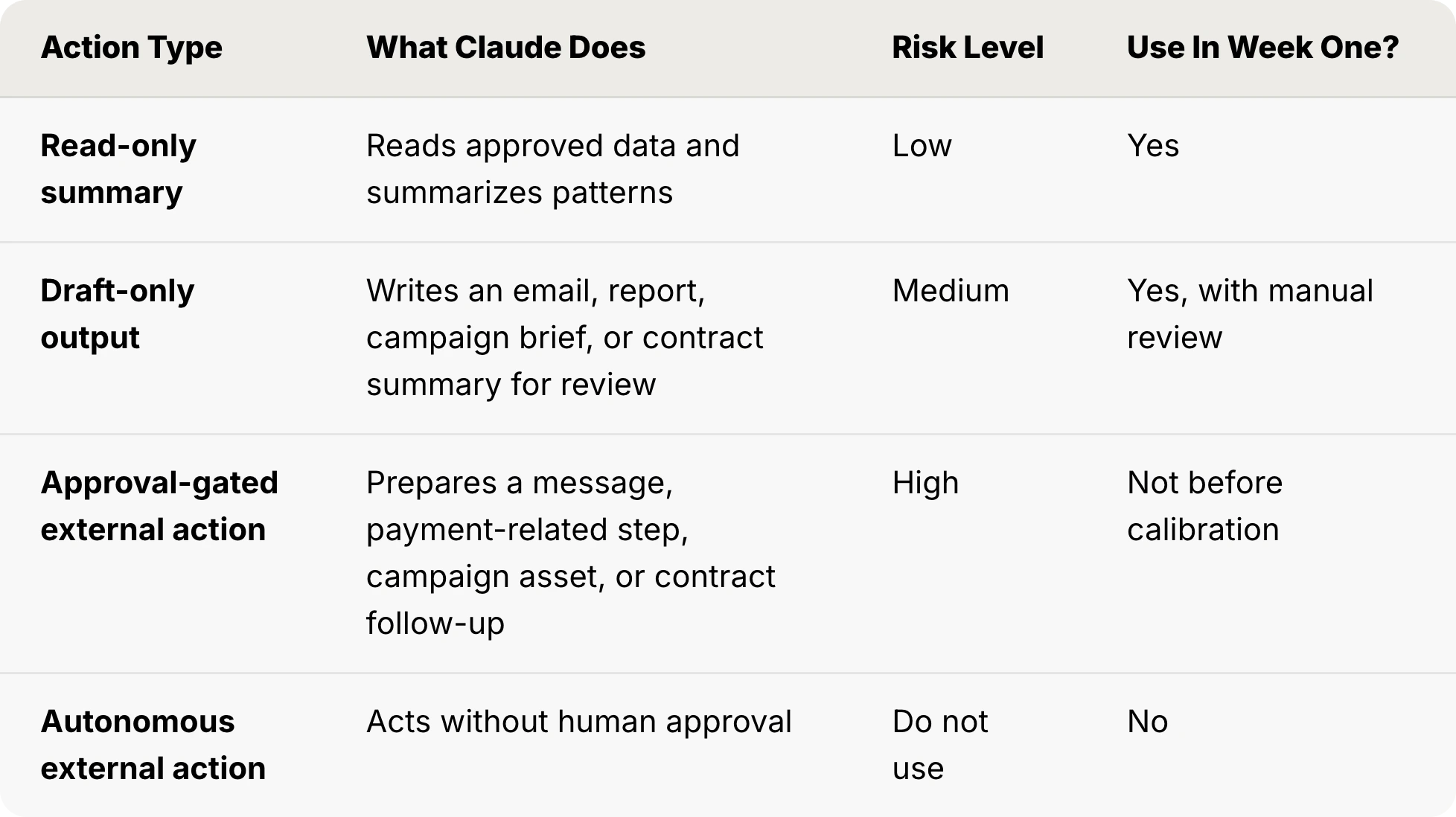
The operating rule is clear: if the output touches money, customers, contracts, payroll, taxes, or public claims, a human approves it. If the source data is messy, the workflow waits.
The Product Strategy Behind Anthropic’s SMB Launch
TechCrunch framed this as Anthropic moving downmarket from enterprise. That’s accurate but undersells the product strategy.
Small businesses account for 44% of U.S. GDP and employ nearly half of the U.S. private-sector workforce. That’s not a niche. It’s the backbone of the economy, and it’s been almost entirely absent from the enterprise AI adoption wave.
The real move is distribution. Anthropic is not building QuickBooks 2.0. They are becoming the intelligence layer inside QuickBooks, PayPal, HubSpot, Canva, DocuSign, Google Workspace, and Microsoft 365. Eight connectors means eight established distribution channels.
Canva and PayPal are not random logos on a launch slide. Canva has $500M+ in B2B revenue and millions of small business users already inside its product. PayPal processes payments for tens of millions of sellers. Anthropic is showing up inside the software small businesses already use every day.
The training play amplifies this. Anthropic launched AI Fluency for Small Business, a free course built with PayPal, to reduce the learning curve. The Claude SMB Tour adds in-person half-day workshops for 100 local business leaders per stop, with a Claude Max subscription included. That’s a ground-level adoption program.
PayPal’s launch materials frame the problem clearly: many small businesses see AI adoption as necessary, but don’t have the tools, training, or implementation path to use it well. Claude for Small Business is Anthropic’s answer to that disconnect.
This connects to a pattern I flagged in my two previous articles (Perplexity for Professional Finance, Context Engineering).
I explained a shift we’re seeing: model providers are increasingly wrapping common use cases into ready-made workflows.
That reduces the burden on users to master prompting or design context-engineering ecosystems themselves.
It also changes the competitive game.
The winning AI product is the model that meets people where the work already happens.
The 4-Week Rollout Plan For Beginners
This is the sequence I’d run if I was starting from zero today. The goal at week four is to have three workflows you trust enough to run weekly without thinking about them.
Week 1: Read-only only. Take the free AI Fluency for Small Business course. Connect your first two data sources in Claude Cowork. Run Business Pulse and Cash-Flow View. Let Claude surface what it sees. Don’t approve any write actions yet. This week is about calibration, not automation.
Week 1 success metric: Claude surfaces at least three useful observations you can verify manually. If it cannot do that, do not move to write actions.
Week 2: First approval-gated actions. Run Invoice Chaser and Campaign Analysis. Review every draft before approving. You will catch the edge cases: unusual customer relationships, specific invoice terms Claude does not know about, campaign segments that should not receive automated outreach. Document what you override. That override list becomes your future customization.
Week 2 success metric: the drafts save review time without creating customer, finance, or brand risk. If every draft needs a rewrite, the workflow is not ready.
Week 3: Canva and DocuSign. Add the creative and legal connectors. Run Canva Asset Generation on one campaign brief. Run Contract Reviewer on your three most common contract types. Check the summaries against your own reads.
Week 3 success metric: Claude helps prepare work you would have delayed, but does not replace the final judgment call.
Week 4: Decision point. By this week, you have four to six weeks of data on which workflows saved time, which needed heavy editing, and which surfaced genuine insights. That data decides which workflows become recurring rituals and which get paused.
Week 4 success metric: keep only the workflows with repeatable value. Pause the shiny ones. Shiny is not a KPI.
Claude For Small Business vs ChatGPT Business vs Microsoft 365 Copilot
Nobody buying AI for a small business is evaluating Claude in a vacuum.
Here’s the comparison:
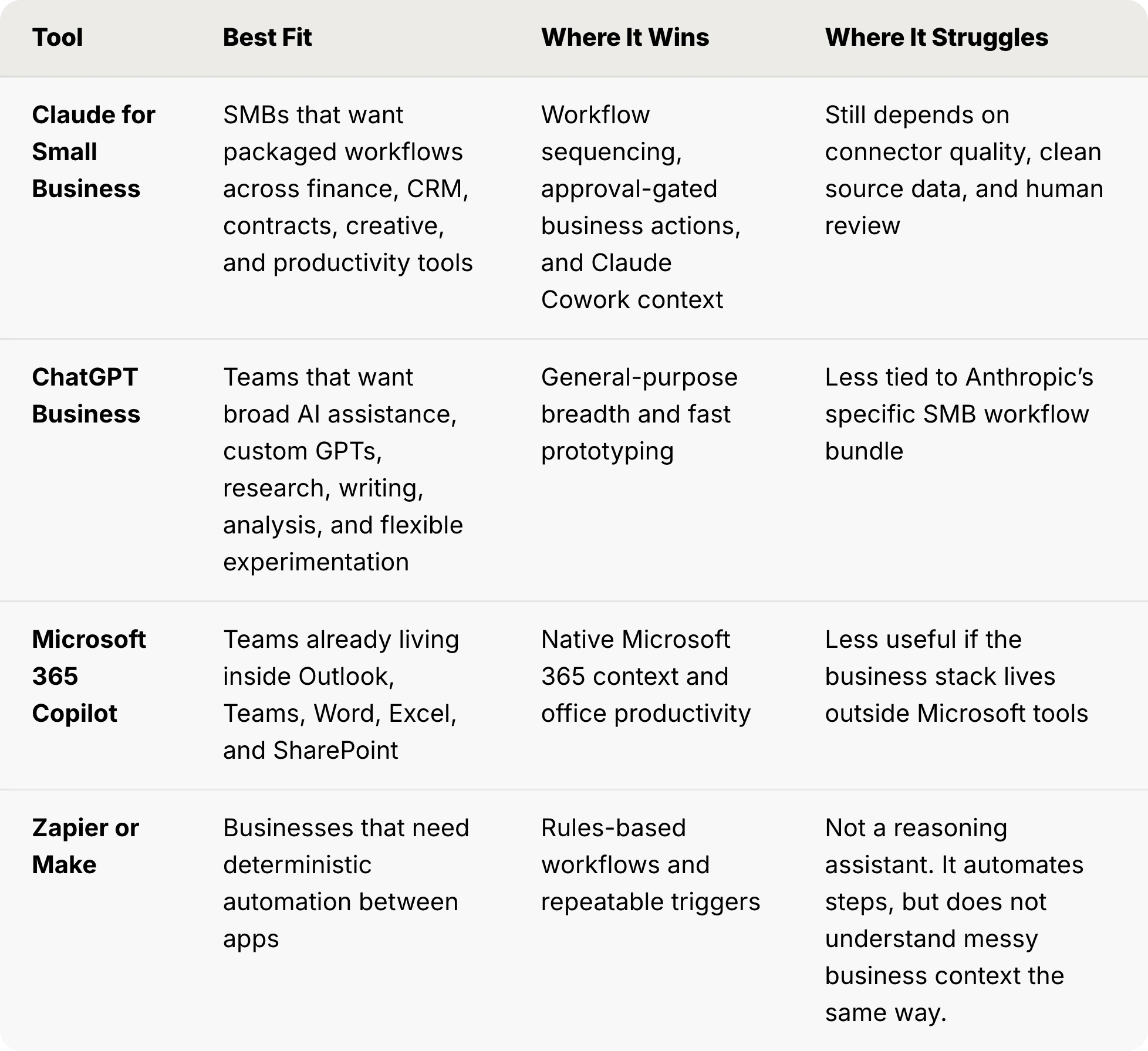
My read: Claude for Small Business is strongest for recurring operational work: running the same workflow every week without rebuilding the context every time.
Key Takeaways
The coverage of this launch got the facts right. What it missed is the implementation sequence.
The decision tree and the trust table I shared above are the answers to that question. Bookmark them. Share them. And when you run your first workflow, come back and tell us what you found.
If you only remember one thing, make it this: start with read-only workflows, prove Claude understands your business data, then move into approval-gated actions. Not the other way around.
If you found this useful, forward it to SMB owners you know.
And if you are testing Claude for Small Business this month, send me your first workflow choice. I want the messy field notes, not the polished vendor demo.
FAQ
What is Claude for Small Business?
Claude for Small Business is a package of 15 ready-to-run agentic workflows, 15 reusable skills, and connectors to eight business tools, designed to integrate Claude Cowork into the daily operations of small businesses. It launched on May 13, 2026, and is available through a Claude Team or Enterprise plan.
How is Claude for Small Business different from Claude Team or Enterprise?
Claude Team and Enterprise give you access to Claude for individual and team use. Claude for Small Business layers a specific set of pre-built SMB workflows, skills, and named connector integrations on top of that foundation. It is not a separate product tier. It is a workflow and connector package for SMB use cases.
Which apps does Claude for Small Business connect to?
The named connectors at launch are Intuit QuickBooks, PayPal, HubSpot, Canva, DocuSign, Google Workspace, Microsoft 365, and Slack. Each connector runs through Claude Cowork’s permission model.
Can Claude send invoices, post campaigns, or make payments automatically?
No. Per Anthropic’s own documentation, users must initiate tasks and approve sensitive actions before Claude sends, posts, or pays. Claude Cowork’s architecture requires explicit approval before any action with external consequences. This is not a setting you toggle off. It is a design principle of the product.
What should a small business automate first with Claude?
Start with read-only workflows: Business Pulse, Cash-Flow View, or Campaign Analysis. These produce output without any write risk, let you calibrate Claude’s accuracy against your data, and build team comfort with the tool before any approval-gated action workflows are added.
Is Claude for Small Business safe for financial data?
It can be safe enough for controlled workflows if permissions are configured correctly, source data is clean, and sensitive actions require human approval. I would start with read-only finance summaries before letting Claude draft invoice follow-ups, payroll plans, or accountant-facing reports.
Do I need clean data before using Claude for Small Business?
Yes. Claude can summarize messy data, but it cannot magically make the underlying source reliable. If QuickBooks, HubSpot, or your document system is chaotic, clean the source before connecting high-risk workflows.
How is Claude for Small Business different from ChatGPT Business or Microsoft 365 Copilot?
Claude for Small Business is positioned around packaged SMB workflows inside Claude Cowork. ChatGPT Business is broader and more flexible for general AI work. Microsoft 365 Copilot is strongest for teams already living inside Microsoft’s productivity stack.
What should stay human-only?
Final approval for payments, payroll, tax-sensitive summaries, legal decisions, customer-facing claims, and any action that creates external consequences should stay human-owned. Claude can draft and surface. The business still decides.
Sources: Anthropic: Introducing Claude for Small Business | Axios: Anthropic wants small businesses to use Claude | TechCrunch: Anthropic courts a new kind of customer | Inc.: Anthropic’s newest Claude feature | Canva/Morningstar: AI campaign creation in Claude for Small Business | Fast Company: Anthropic courts mom-and-pop shops | PayPal: AI Fluency for Small Businesses | Claude: Small Business Solutions | Anthropic Academy: AI Fluency for Small Businesses

WHY SUBSCRIBE ・YOUR BENEFITS・ TOOLS I BUILT・CLAUDE HUB・PERPLEXITY HUB ・VIBE CODING HUB
Very very informative. Thank you Karo.
I think their pricing is gonna be prohibitive for small business owners unless they subsidize and don't offer frontier models.