

Perplexity Hub: Perplexity Guides for Computer, Comet, Credits & Workflows (2026)
Tested guides, credit strategies, and workflows for Perplexity Computer, Comet, and Labs.

Last updated: May 2026. Actively maintained.
TL;DR: Perplexity Hub is an independent library of tested guides for Perplexity Search, Files & Apps, Comet, and Computer, focused on real workflows, credit strategy, and SEO/AIO/GEO use cases. It helps you decide which Perplexity product to use, shows what you can ship with each, and documents where credits disappear and where the “wow” lives.
I wrote my first Perplexity article in October 2025, not that long ago when you think about it.
Since then, Perplexity has shipped Comet, Computer, Comet Plus for publishers, Personal Computer, mobile apps, and become a tool I reach for daily.
To bring the most value to my readers, I’ve been pushing it to its limits, breaking things on purpose, and wearing different hats in the process: testing it as a builder, product manager, writer, and beginner.
This page collects everything I’ve published about Perplexity on Product with Attitude.
Guides, credit strategies, workflow breakdowns, product manager’s commentary, competitive landscape analysis, and posts where Perplexity plays a supporting role alongside Claude, Replit, and the rest.
A few things I want to make clear:
Every guide is tested on real projects.
Every credit estimate comes from my own usage (learned the expensive way on at least two occasions).
Every infographic you see started as a Miro board full of scattered thoughts.
Nothing theoretical. I don’t skip the parts that don’t go as planned, and if you keep reading, neither will you.

Hey, I’m Karo Zieminski 🤗
AI Product Manager and builder.
I write Product with Attitude, an AI newsletter for thousands of subscribers developing critical AI literacy the only way it sticks: through practice.
We don’t just use AI. We build workflows, automations, and products with it, while studying how AI itself is built, positioned, and woven into our work.
If you’re new here, welcome!


What’s Inside

What Is Perplexity, and Which Product Do You Need?
Perplexity AI is known as an AI-powered search and research platform, but I believe that framing undersells it. It’s becoming an ‘‘AI-everything’’ platform.
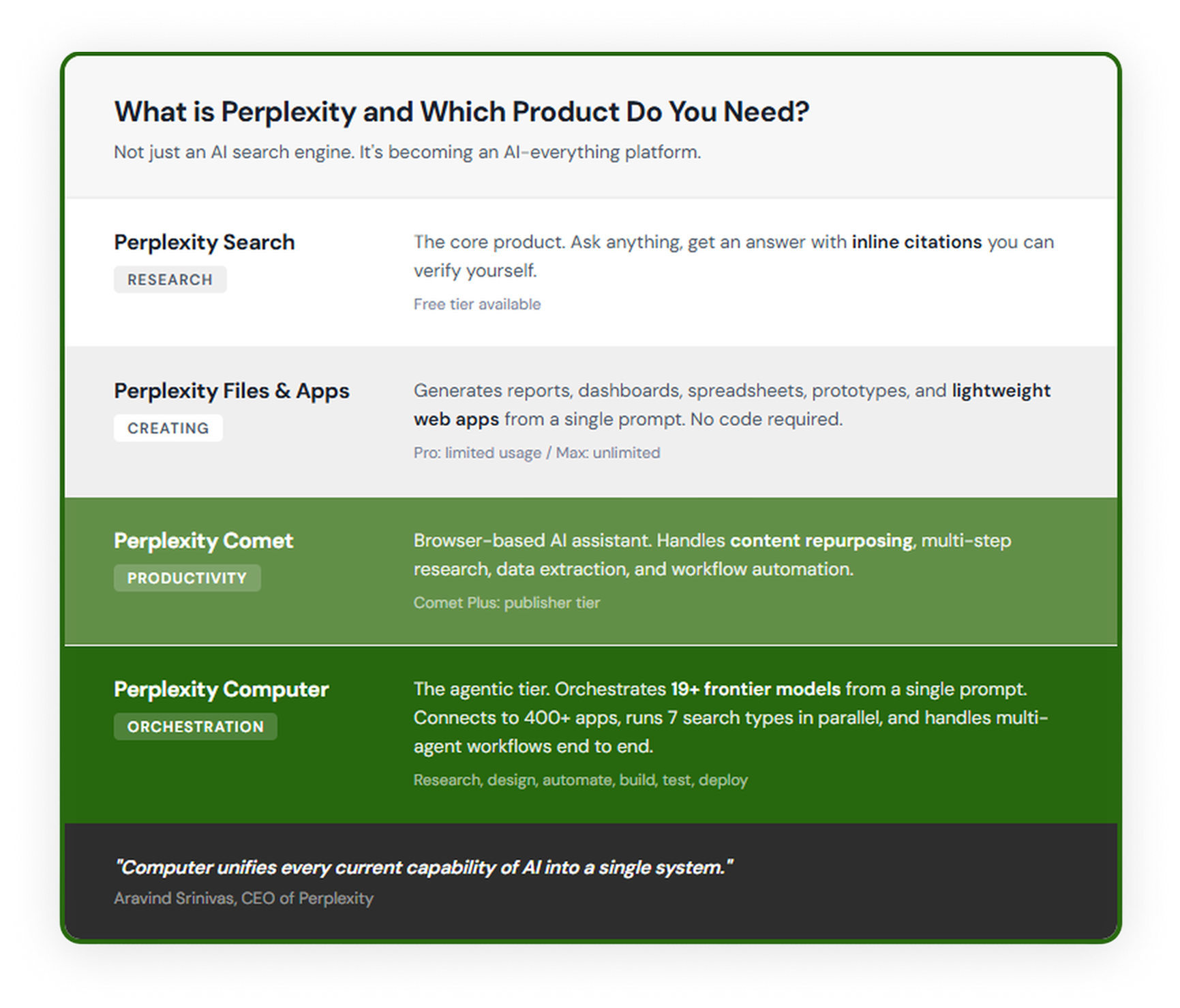
Four Perplexity products serve different needs:
Perplexity Search is for research.
It’s the core, OG product. Ask anything, get an answer with inline citations you can verify yourself. Free tier available.
Perplexity Files & Apps (Previously known as Labs) is for creating.
Perplexity Files & Apps generates reports, dashboards, and lightweight web apps from a single prompt, with no code required. Pro subscribers get limited usage, Max gets unlimited.
Perplexity Comet is for productivity.
Perplexity Comet is a browser-based AI assistant that handles content repurposing, multi-step research, and workflow automation.
Perplexity Computer is for orchestration.
Perplexity Computer is a cloud-based AI agent that orchestrates 19+ frontier models (including Claude Opus 4.7, GPT-5.5, and Gemini Pro 3.1) to research, build, automate, and deploy from a single prompt.
It’s the agentic tier, and it’s where the wow factor lives.
Computer unifies every current capability of AI into a single system.
—Aravind Srinivas
Perplexity Computer
What Can You Do and Build With Perplexity Computer?
These guides cover what Perplexity Computer is, what it costs, and how to use it without burning through credits.
Perplexity Computer Review: What I Built in One Night
I explain why Computer is novel, how it compares to Claude Cowork and OpenClaw, and what I built during my first night with it.
Perplexity Computer for Professional Finance
Perplexity Computer for Professional Finance launched May 4, 2026. I tested it on Palantir. The output was magnificent. The death of prompting is the part that should worry you.
Perplexity Computer in May 2026: A Set of Updates That Change Almost Every Serious Use Case
Five Perplexity Computer workflows I run every week. Credit cost, model, time saved, PM read, and the critical AI literacy check on each one.
When Computer Wins (And When It Doesn’t)
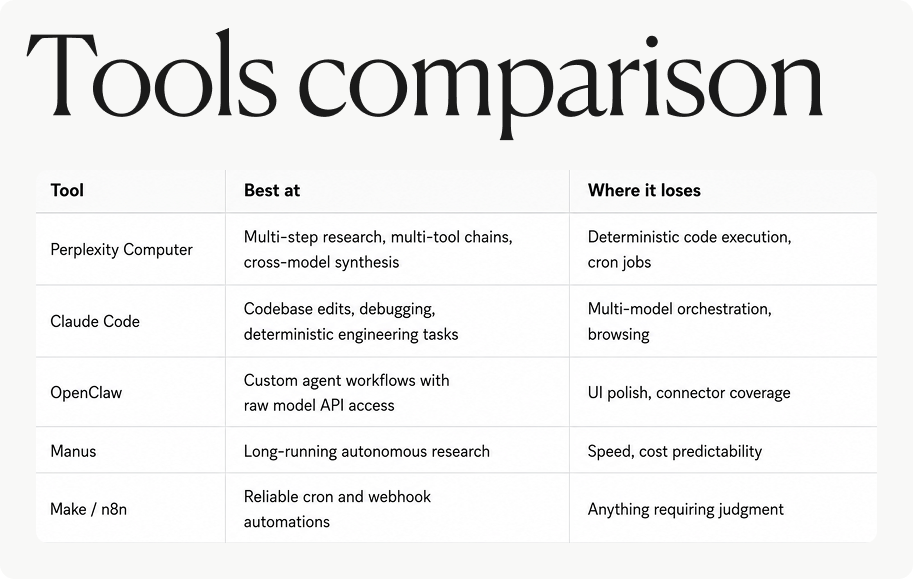
We have five real options for orchestrated AI work today. Computer is one of them. Sending the wrong job to the wrong tool is the most expensive mistake we can make.
Perplexity Computer Pricing
How to Save Credits on Perplexity Computer (Part 1)
I tested Computer hard to understand the pricing strategy and documented where credits disappear. This guide covers the credit system, a calibration experiment you can copy, and three workflow prompts I use to spend less.
Save More Credits: Advanced Patterns for Perplexity Computer (Part 2)
Seven techniques that cut credit consumption by 50%+. Covers the compound context tax, the fresh thread rule, splitting strategy from execution into separate threads, and when to replace conversation with scripts entirely. Part 2 of the credit-saving series.
If the credit guides saved you money, a premium membership covers everything I publish, including the advanced guides, prompt packs, tools, and learning paths.
Where Does Perplexity Fit in Your AI Stack With Claude, Replit, and Others?
10 Tools for Running a Bestselling Substack in 2026
Perplexity is one of the core tools in my daily workflow alongside Claude, Recraft, and the rest. This post shows exactly how each tool fits.
Perplexity for Vibe Coders
A 16-step roadmap for building production-ready apps with AI. Perplexity serves as the research and fact-checking layer alongside Claude, Replit, and Cursor.
Common Mistakes People Make With Perplexity
Most of these are setup problems. I made every single one before I stopped.
Treating Perplexity like Google. Keyword piles don’t work here. The model rewards questions with context: the decision you’re making, what “good” looks like, what to cite. Vague in, vague out.
Using the wrong mode for the job. Search is for quick answers. Research is for deep, multi-source synthesis. Labs is for building dashboards, apps, and mini-tools. Picking the wrong one costs time on free, credits on Max.
Skipping follow-ups. Perplexity threads keep context. One prompt and done is how we leave 80% of the value on the table. Start broad, narrow the scope, then force precision (”define terms,” “show assumptions,” “compare options”).
Trusting the first answer. Every answer has numbered citations. Click them. Especially for anything going into a post, a client deck, or a decision that matters. The source transparency is the whole point of using Perplexity over ChatGPT in the first place.
Running Computer tasks without scoping them. Computer credits burn fastest on open-ended prompts. “Research this market” can eat 500+ credits. “Research this market, return 5 bullets and 3 sources, stop” returns a clean answer for a fraction of that.
Ignoring Academic focus for research work. Web mode pulls from the open internet. Academic pulls from peer-reviewed sources. For anything citing studies, stats, or scientific claims, switching focus is the difference between a solid post and a fact-check disaster.
Not using Spaces. Every new thread is a cold start. Spaces carry instructions, sources, and context across conversations. One well-configured Space replaces ten sloppy prompts.
The pattern underneath all seven: Perplexity rewards deliberation.
About This Library
What is this Perplexity library?
An independent collection of tested guides for Perplexity Search, Computer, Comet, and Labs. Every article comes from hands-on use, not recycled press releases.
Who is this for?
Anyone who uses Perplexity for real work: writers, teachers, researchers, PMs, builders, and knowledge workers. Whether you’re on the free tier or burning Computer credits daily, there’s something here.
How is this different from Perplexity’s own documentation?
This library started with a Comet use-cases post in November 2025 and grew into the one of the most comprehensive independent Perplexity resources on Substack. Every article comes from hands-on use, not recycled press releases.
Perplexity explains what the products can do. These guides show what works in practice: the workflows, the credit traps, the workarounds, and the use cases their marketing doesn’t cover. The credit-saving data came from 45,000 credits of live testing.
To put things in perspective, I spent three weeks testing Computer before writing a single cost-saving recommendation. That’s the difference.
What does Perplexity Computer cost in 2026?
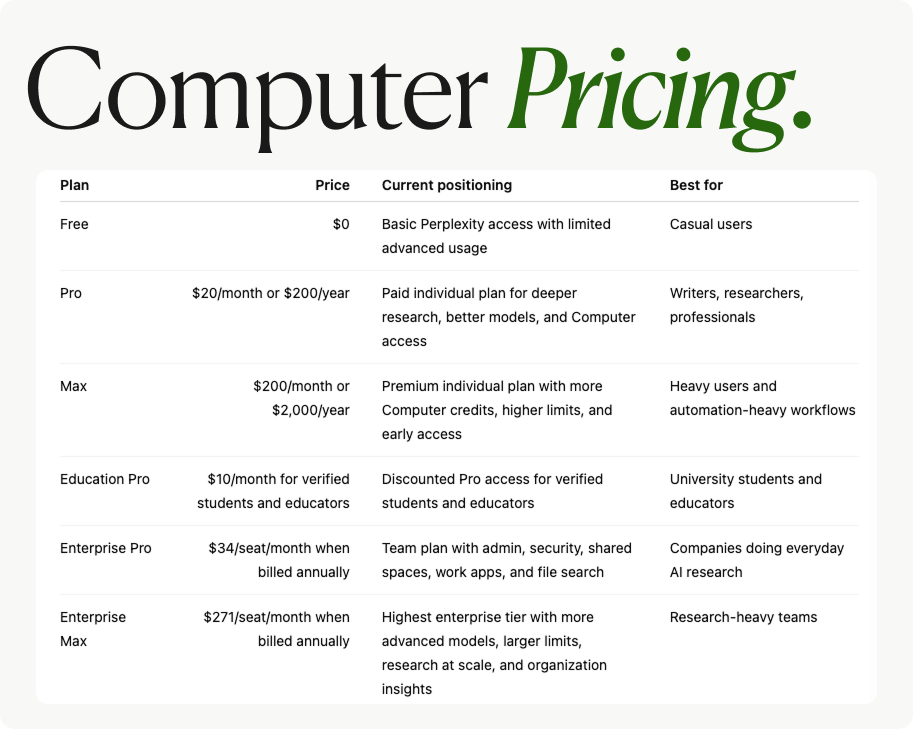
Perplexity Computer is available on the Pro plan ($20/month) with pay-per-use credits, and on the Max plan ($200/month) which includes 10,000 credits per month. Enterprise Max is $325/seat/month with 15,000 credits.
Which article should I start with?
If you’re new to Perplexity Computer, start with the full review. If you’re already using it and burning credits, go straight to the credit-saving guides: Part 1 first, then Part 2 for the advanced techniques.
How often is this page updated?
Every time I publish a new Perplexity-related guide, it gets added here. The “Last updated” date at the top reflects the most recent addition. As of March 2026, this library covers 4 dedicated Perplexity guides plus cross-tool resources where Perplexity plays a key role.
FAQs
What is Perplexity Search best for?
Perplexity Search is best for research with citations. You ask a question, get a synthesized answer, and can inspect the sources behind the claims.
Use it when you need fast grounding: market research, source discovery, fact-checking, competitor scans, definitions, and article prep. The power move is not treating it like Google. Keyword piles are lazy. Perplexity rewards questions with context, constraints, and a clear definition of what a good answer looks like.
What is Perplexity Files & Apps?
Perplexity Files & Apps, previously known as Labs, is the creation layer. It can generate reports, dashboards, and lightweight web apps from a prompt, without requiring you to write code.
Use it when your desired output is a finished artifact rather than a research thread. It is especially useful when you want to turn information into a shareable report, quick dashboard, or mini-tool. If you are only asking for a cited answer, Search is usually the cheaper and cleaner choice.
What is Perplexity Comet?
Perplexity Comet is a browser-based AI assistant for productivity workflows. It helps with tasks like content repurposing, multi-step research, and browser-context work.
Think of Comet as the layer for working inside the web, not just asking about the web. It becomes useful when the task requires navigation, comparison, summarization, or transformation across web pages and tabs.
What is Perplexity Computer?
Perplexity Computer is the agentic tier of Perplexity. It is described in the source page as a cloud-based AI agent that can orchestrate frontier models to research, build, automate, and deploy from a single prompt.
This is where the “wow” lives. It is also where the credit bill can become stupid if you are sloppy. Computer is best for serious, scoped workflows where the output is valuable enough to justify agentic execution.

What can you build with Perplexity Computer?
You can use Perplexity Computer for multi-step workflows such as market research, financial analysis, product strategy, competitive landscape reviews, app prototyping, automation planning, and deployment-oriented tasks.
The strongest use cases are the ones with clear constraints. A bad prompt says, “Research this market.” A better prompt says, “Research this market, return five bullets, cite three sources, compare two segments, and stop.” Computer can do powerful work, but it needs boundaries or it will happily turn your credits into smoke.
Some examples:


What does Perplexity Computer cost in 2026?
According to the pasted source text, Perplexity Computer is available on the Pro plan at $20/month with pay-per-use credits, the Max plan at $200/month with 10,000 credits per month, and Enterprise Max at $325/seat/month with 15,000 credits.
Pricing and product packaging can change quickly in AI tools, so the safe move is to treat this as a May 2026 snapshot and verify the current plan details before making a buying decision. For readers already using Computer, the bigger question is often not “What does it cost?” but “How do I stop wasting credits?”

How do Perplexity Computer credits work?
Perplexity Computer credits are consumed when Computer performs agentic work. The more open-ended, long-running, or poorly scoped the task, the faster credits disappear.
The core rule is brutal but useful: ambiguity costs money. Long threads, compound context, broad research requests, and strategy-plus-execution prompts all increase waste. Scoped prompts, fresh threads, tighter deliverables, and separating planning from execution help reduce burn.
How can I save credits with Perplexity Computer?
You save credits by scoping the task before Computer starts working. Define the deliverable, limit the number of sources or bullets, ask it to stop after a specific output, and avoid using one giant thread for everything.
The pasted source text highlights several advanced credit-saving patterns: the fresh thread rule, avoiding compound context tax, splitting strategy from execution, and replacing long conversations with scripts when appropriate. The short version: don’t ask an expensive agent to do what a cheap search, a clean prompt, or a small script can do better.
What are the most common mistakes people make with Perplexity?
The most common mistake is treating Perplexity like Google. Perplexity performs better when you ask clear, contextual questions instead of dumping keyword fragments into the box.
Other expensive mistakes include using the wrong mode, skipping follow-ups, trusting the first answer without checking citations, running Computer without scope, ignoring Academic focus for research-heavy work, and not using Spaces. The pattern underneath all of them is the same: Perplexity rewards deliberation. Lazy input gets lazy output.
When should I use Academic focus in Perplexity?
Use Academic focus when you need peer-reviewed or research-grade sources. Web mode is fine for open-internet research, but Academic focus is safer for studies, statistics, scientific claims, and evidence-heavy writing.
This is especially important for AI literacy content, market analysis, health-adjacent claims, and any post where readers may cite you later. One wrong source can turn a smart article into a fact-checking bonfire.
What are Perplexity Spaces?
Perplexity Spaces let you carry instructions, sources, and context across conversations. They reduce cold starts and help keep repeated research workflows consistent.
If every new thread is a blank slate, you waste time rebuilding context. A well-configured Space can replace ten sloppy prompts because the tool already knows the domain, preferences, and source base you want it to use.
Where does Perplexity fit in an AI stack with Claude, Replit, Cursor, and other tools?
Perplexity fits best as the research, source discovery, and fact-checking layer in an AI stack. Claude, Cursor, Replit, and similar tools are often better for writing, coding, building, and iteration, while Perplexity is strong when you need grounded answers and cited research.
For vibe coders, Perplexity can validate assumptions before building. For product managers, it can map markets, compare competitors, and pressure-test strategy. For writers, it can surface sources and help avoid hallucinated claims. The move is not to crown one tool. The move is to send the right job to the right tool.

Is Perplexity useful for product managers?
Yes. Perplexity is useful for product managers because it compresses research loops: market scans, competitor analysis, customer-problem framing, feature comparison, technical discovery, and strategic synthesis.
The product-manager mistake is outsourcing judgment. Perplexity can gather and organize information, but you still need to decide what matters, what is missing, and what the business should do next. AI can accelerate product work. It cannot replace product taste.
Is Perplexity useful for writers and newsletter operators?
Yes. Perplexity is useful for writers because it helps with source discovery, fact-checking, article planning, competitive framing, and finding adjacent questions readers are already asking.
For newsletter operators, the real advantage is workflow design. Perplexity can support content research, repurposing, SEO/AIO/GEO planning, and citation hygiene. But the writing still needs a point of view. Otherwise you get the same gray sludge everyone else is publishing.
Is Perplexity useful for vibe coders?
Yes. Perplexity is useful for vibe coders as a research and validation layer before and during the build process. It helps you understand APIs, compare tools, check documentation, investigate errors, and validate whether an app idea has enough substance to build.
Use it before opening your coding tool. Ask what stack fits, what edge cases matter, what competitors already exist, and what users would expect. That upfront research can save hours of beautiful nonsense.
Is Perplexity Computer useful for professional finance?
According to the pasted source page, Perplexity Computer for Professional Finance launched on May 4, 2026, and was tested on Palantir. The key value described is not just better prompting, but a shift toward richer agentic analysis.
Finance is a high-stakes use case, so verification matters. Treat outputs as analysis support, not investment advice. The useful workflow is to ask for structured financial research, source-backed assumptions, comparable companies, risk factors, and a clear audit trail.
Subscribe if you want tested workflows, credit-saving strategies, AI stack breakdowns, prompt patterns, tools, and learning paths without wading through launch hype.
The free guides help you understand the landscape. The premium layer is for readers who want the deeper systems: advanced techniques, cost-saving patterns, prompt packs, and practical workflows that can pay for themselves if they prevent one expensive agentic faceplant.