

Perplexity Computer: What I Built in One Night (Review, Examples, and How It Compares to OpenClaw and Claude)
Perplexity Computer explained: 19+ frontier models, unified with files, tools, and multi-agent workflows in a single system. A practical guide to why it's novel and how to use it.

I was about to go to sleep when I saw this:


Regular readers have seen me gush about Perplexity more than once. Or twice.
I went all-in on Comet from day one, and I have a feeling Computer is about to earn the same loyalty.
I stayed up testing it last night and came out with 2 micro apps, 4 finished research packets, 1 new automation, and a backlog of build ideas.
Here's everything you need to know.

Hey, I’m Karo 🤗
AI Product Manager, builder, and a serial workflows optimizer.
If you're new here, welcome!
Here's what you might have missed:
Claude Skills are taking the AI community by storm
Why building with AI matters for your critical AI literacy
How I turned Notion into Claude’s Persistent Memory, and 10+ Connector Tips Most Guides Skip.
Today, we’re going to look at:
What Is Perplexity Computer?
Perplexity Computer: The Wow Factor
What I Built With Perplexity Computer Since Last Night
Other Examples of What Perplexity Computer Can Do
Does Perplexity Complete or Compete with Claude?
Perplexity Computer vs OpenClaw
Pricing, Access, Credits - Is it worth it?
My Top Tips
The 4-Line Test Every AI Launch Has to Pass
Before we dive in, a quick disclaimer.
For me, a launch in 2026 only matters if it makes me rethink my entire workflow. Everything else is noise - and there’s a lot of it.
Here's how I pick my tools:
If it saves me time, I’ll try it.
If it clears my head, I’ll try it.
If it gives me new superpowers, I’ll try it
If it does all of the above, I’ll keep it.
I’m sharing this because I’m not here to inflate AI hype. I’m here to improve my workflows and pass along what sharpens our collective AI literacy.
Hold onto that thought, because it explains why I’m so interested in this launch.
What Is Perplexity Computer?
Perplexity Computer is a brand-new AI platform that Perplexity CEO Aravind Srinivas launched just yesterday, February 25, 2026.
Despite its hardware-sounding name, it's not an actual computer. It’s a cloud-based AI system made up of multiple agents.
Perplexity calls it a ‘‘general-purpose digital worker’’.
In non-jargon terms: it’s an AI that can research, design, build, test, deploy, automate, and, with 400 app integrations, do at least 400 other things I didn’t have time to explore last night.
That means that as users, we can run all of this from a single prompt and a single interface.
Computer unifies every current capability of AI into a single system.
—Aravind Srinivas
Perplexity Computer: The Wow Factor
1. Massively Multi-Model Orchestration
Perplexity Computer orchestrates 19+ frontier AI models, each handling what it does best:
Claude Opus 4.6: serves as the core reasoning engine
Gemini: tackles extensive research tasks
ChatGPT 5.2: assists with long-context recall and broad searches
Grok: handles simpler, lightweight tasks efficiently
Nano Banana: generates images
Veo 3.1: produces videos
No need to jump from Claude to Gemini and back to Grok. Nineteen brains wait for your prompt, and Computer picks the best model combo for the job.
For a lazy time-constrained power user like me, that makes perfect sense.
Letting AIs from different providers collaborate this way is a genuinely novel approach: the orchestration layer decides who does what, so we don’t have to glue models together with n8n or manually configure them in OpenClaw anymore.
2. Persistent Memory and Personalization
Computer remembers your past work, maintains persistent memory, and connects to your services and files.
3. End-to-End Project Execution
Perplexity Computer doesn’t just chat with you, it does the actual work:
it formulates a strategy
assigns sub-agents to specific duties
and delivers a finished project
4. One Click, Dozens of Computers. At Once.
You can run dozens of these “Computers” in parallel and let them work asynchronously.
5. For Power Users
If you’re a control freak like me, this is the fun part. You can choose different models for different sub‑agent tasks and control your token spend.
What I Built With Perplexity Computer Since Last Night
✔︎ 2 Micro-Apps
Branded Callout Box Generator App
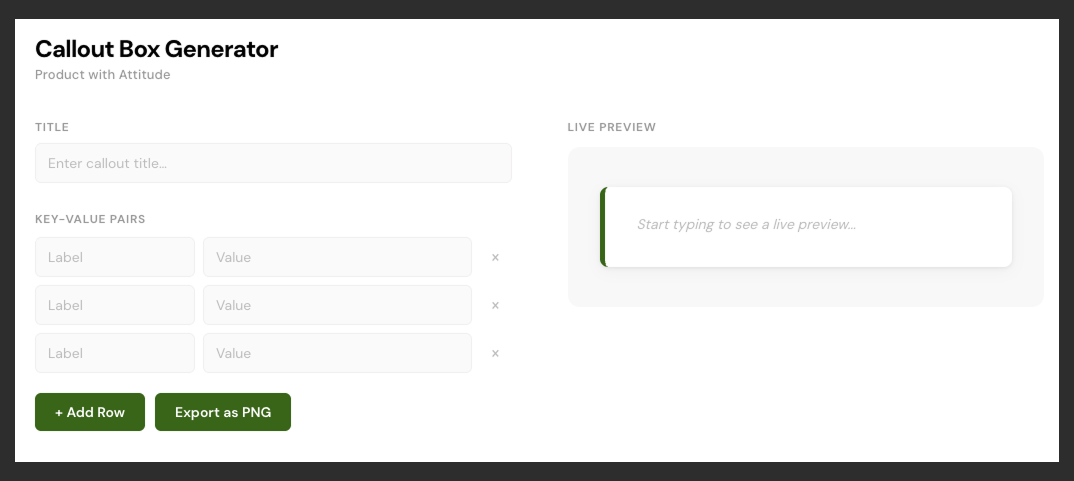
I gave Perplexity Computer my brand-guidelines.md file, asked it to generate a callout box.
Once I was happy with the results, I asked it to build an app that generates these boxes consistently. It did.
Live preview, export to PNG, the exact colors and typography from my brand spec.
If you’d like to repeat this experiment:
Memorize this brand guidelines file for future use [paste file]. Then generate a callout box with this text: [your text]. Once I approve the design, build me an app that generates these callout boxes consistently in this exact style, with live preview and PNG export.Short and sweet.
Branded Table Generator App
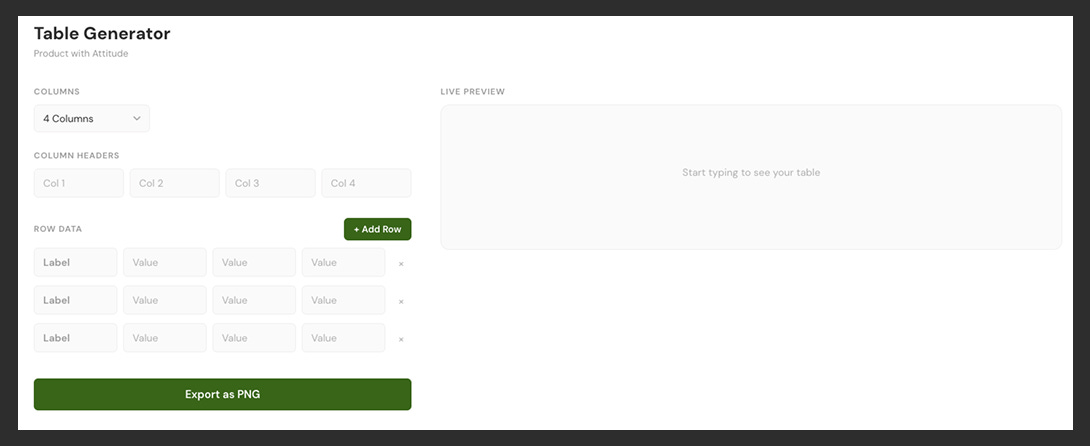
Then I asked for a table generator in the same style as the callout boxes.
Same deal: column controls, row inputs, live preview, pixel-matched output with the green border and bold first column.
Build me an app that generates tables in my branding style, with column controls, live preview, and PNG export.New Repo in Github
Both apps got pushed straight to my GitHub repo in one command.
What Worked And What Didn’t
What worked:
Total time from “store my branding” to two working brand-consistent tools in my repo: under 30 minutes.
No Figma plugin. No developer handoff. No we’ll scope it next sprint. A conversation that started with a markdown file and ended with shipped code.
What I didn’t like:
Similar to Lovable, Perplexity added a Generated with Perplexity Computer watermark to both apps. I’m planning to train that behavior out of it.
✔︎ 4 Finished Research Packets
My guess is most of the upcoming reviews will focus on the flashy stuff: websites, videos, code.
I keep coming back to the research engine.
Computer runs seven search types in parallel: web, academic, people, image, video, shopping, social. Not sequentially. All at once.
It reads full source pages, not just search snippets. It hits scholarly databases directly.
It cross-references what it finds. Similarly to the typical use case in NotebookLM, you can ask things like What do these sources disagree on? and get an analysis, not a summary.
Tips That Make Your Research Sharper
Ask for charts or timelines instead of text explanations
Frame it as a collaborator: “What questions should I be asking about this?”
Request cross-referencing: “Which source is most critical, and why?”
If you’ve ever spent an afternoon trying to get a comprehensive view of a topic from five different tools, this collapses that into one prompt.
Other Examples of What Perplexity Computer Can Do
Perplexity runs a public live stream of real tasks.
Some examples:
Build a SP500 Bubble Chart Website
Create an interactive bubble chart for every company in the S&P 500. X-axis: trailing 12-month revenue. Y-axis: trailing 12-month net profit. Bubble size: current market cap. Color: % change in share price over the last 12 months (green-to-red gradient). Do a thorough analysis and highlight at least 10 interesting findings. Package it all as a website I can share.Build a GIF of Tesla’s Stock Price Over The Last 10 years
Create an animated GIF of Tesla's stock price over the last 10 years. Annotate each major inflection point with the event that caused it — Cybertruck unveil, S&P 500 inclusion, stock splits, earnings misses, Twitter acquisition by Elon, etc. Make the annotations fade in and out as the timeline progresses.Does Perplexity Complete or Compete with Claude?
This is the nuanced part and I spent a part of last night mapping it out in Miro.
The answer is: both, simultaneously.
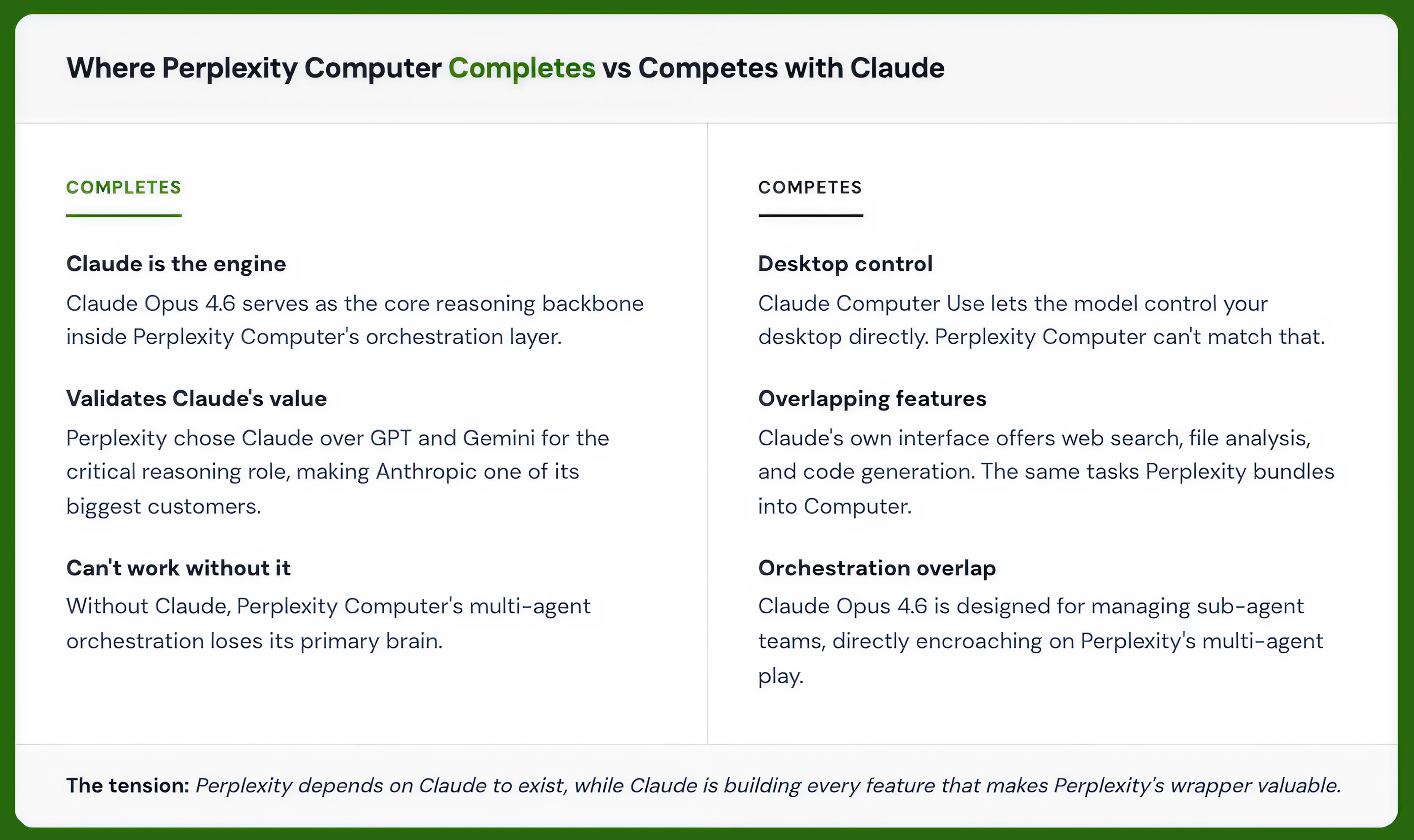
Where Perplexity Computer Completes Claude
It literally runs on Claude. Claude Opus 4.6 serves as the core reasoning engine inside the system.
Without Claude, Perplexity Computer’s orchestration layer loses its primary brain.
In this sense, Perplexity is one of Anthropic’s biggest customers. It validates Claude’s value by choosing it as the reasoning backbone over GPT or Gemini for that critical role.
Where Perplexity Computer Competes with Claude
The competitive tension is real too.
Desktop control: Claude Computer Use lets the model control your desktop directly; a capability Perplexity Computer doesn’t match.
Overlapping features: Claude’s own interface offers web search, file analysis, and code generation. The same tasks Perplexity bundles into Computer.
Orchestration overlap: Claude Opus 4.6 is designed for managing sub-agent teams, directly encroaching on Perplexity’s multi-agent orchestration play.
Perplexity Computer vs Claude Cowork
These tools are entangled, but they represent two visions of agentic AI: a deep single-model specialist on your machine, or a multi-model orchestrator in the cloud.
The key differences:
Cowork uses Anthropic models only and runs on your machine (your computer needs to be on);
Computer orchestrates 19 models from multiple providers and runs entirely in the cloud (tasks can run for weeks while you sleep).
I’m planning to use both.
Cowork as my specialist for deep document work.
Computer as my generalist for anything that needs to be researched, built, deployed, and connected to my other tools from a single prompt while I’m asleep.
Perplexity Computer vs OpenClaw
OpenClaw, the open-source AI agent with 219,000 GitHub stars, runs locally on your hardware, connects to WhatsApp, Slack, and iMessage, and does real things: clears inboxes, checks you in for flights, manages calendars, runs scripts.
But the ecosystem imploded fast: Google suspended users from Antigravity for "malicious usage," Anthropic and Google started banning flat-rate accounts connected to OpenClaw without warning or refunds, and NCC Group called its attack surface "near-limitless."
Perplexity Computer takes the opposite bet. Everything runs in Perplexity's secure cloud sandbox.
No local setup, no OAuth drama, no provider bans, no self-modifiable identity files that security researchers flag as a risk.
If you're a developer who wants full system access and local execution, OpenClaw is the power user's dream (assuming the bans don't reach you).
If you'd rather spend your time on outcomes than plumbing, Perplexity Computer is the cleaner, more stable path.
And there’s more - you don’t need to chain/assign models yourself anymore. It’s done for you by the orchestrator layer.
Pricing, Access, Credits - Is it worth it?
Perplexity Computer is currently available to Max subscribers (priced at $200/month) with rollout to Pro and Enterprise users coming later.
Pricing is usage-based with a credit system:
10,000 credits per month included with Max subscription
One-time bonus of 20,000 credits for early adopters (expires after 30 days)
Users can set spending caps and choose which AI models power their sub-agents, giving control over performance and cost
Is it worth it? For me, yes. But $200/month is not pocket change.
As always, I encourage everyone to test for themselves.
My Top Tips
Tell it What, not How
When you first touch a tool this powerful, your instinct may be to micromanage it: step one, do this; step two, do that.
Don’t.
Computer is built around task decomposition:
Give it a clear outcome (Build an app that does XYZ)
Computer breaks that into subtasks, assigns them to specialized agents, and surfaces checkpoints for you to review.
The best results come from being specific about what you want, not how to get there. It’ll figure out the orchestration. You own the judgment calls.
Run multiple projects simultaneously
Anything that reliably saves time is worth testing.
And with enough credits, you can go from one to‑do to hundreds of active projects.
Let it work in the background
Long-running tasks can run for weeks, only interrupting when it needs a decision from you.
Related Reads
I Tested Perplexity Computer Hard. Here’s How I’d Save Credits Now

WHY SUBSCRIBE ・LEARNING PATHS・ PREMIUM RESOURCES・TESTIMONIALS
I am intrigued! Must go check this out.
Hi Karo!
Thank you so much for this helpful and timely tutorial.
I'm also a huge fan of Perplexity Pro. I think it's the best value.
(I love how it lets me use Claude, Grok, ChatGPT, Gemini, and Kimi.)
In any case, I saw Perplexity Computer in my Perplexity Pro account lastnight. (Or was it the night before.)
I had no clue what it was! But, they let Pro users preview it for 24 hours or so.
But now, they have "clawed" it back behind a paywall, lol.
I appreciate your superb breakdown nevertheless! (I hope they let us back in soon. It looks very cool!)
Cordially,
Mike D