

I Tested Perplexity Computer Hard. Here’s How I’d Save Credits Now
The tool is powerful. The credit burn is real. Here’s how I’d use it more carefully after seeing where credits disappear.

Perplexity Computer is one of the most impressive AI products I’ve tested this year.
It is also one of the easiest ways to spend a lot of money.
Long-time readers know I’m not here to hype shiny tools, but to learn how to use them well. I push them to their limits and report what I find.
That’s exactly what I’ve been doing with Perplexity Computer since launch day, building everything from infographics and automations to a new tool for this community that drops next week.

Hey, I’m Karo Zieminski 🤗
AI Product Manager and builder.
I write Product with Attitude, an AI newsletter for thousands of subscribers developing critical AI literacy the only way it sticks: through practice.
We don’t just use AI. We build workflows, automations, and products with it, while studying how AI itself is built, positioned, and woven into our work.
If you’re new here, welcome! Here’s what you might have missed:
Why Your Perplexity Credits Vanish (and How to Make 10K Last)
Save Credits in Perplexity Computer: Advanced Guide, Part 2 (2026)


What’s Inside
What Is Perplexity Computer?
Perplexity Computer is a brand-new general-purpose digital worker launched less than a month ago.
It researches, synthesizes, designs, builds, tests, deploys, and automates. It breaks requests into tasks and subtasks, spins up sub-agents, selects the best model for each step, and runs the work asynchronously.
That means we can run all of this from a single prompt and a single interface.
Computer unifies every current capability of AI into a single system.
—Aravind Srinivas
The orchestration layer that lets Computer juggle different models, apps, and tools is seriously impressive, and in real use its accuracy and speed have consistently exceeded my expectations.
But then there's the credit system.
How the Pricing Works
For detailed pricing information, read this first:
The subscription
With the $200/month Max plan, you get 10,000 credits and a capable multi-model agent with solid spending guardrails:
auto-refill disabled by default,
configurable monthly caps,
long-running tasks that pause when limits are reached instead of increasing the bill.
Both the value and the high price are true. $200/month is $200/month. That number only makes sense if your work involves regular multi-step research and execution.
The kind of work that eats hours: consultants, analysts, founders, builders.
If the time savings don’t clearly pay for themselves, you’re probably not the target customer.
The bonus: generous, but temporary
As a Max user, I received a one-time bonus of 35,000 credits on top of my 10,000 monthly allocation.
This was refreshingly generous and gave me a chance to understand how to use the system, and observe my usage patterns.
Since exploration was my goal, I pushed it hard, building automations, research pipelines, websites, and even a new tool I’ll be launching for my Substack community soon.
The total of 45,000 credits was just enough for all that. I’ll show you a detailed cost breakdown below.
But two of the automations I built were much more credit-hungry than I expected, so I ended up topping up beyond my original plan.
Not ideal.
The credits
Another not-so-great realization was that the credit structure isn’t as clear as I’d like it to be.
Perplexity has documented how credits work at a high level, but they have not published clear per-task or per-workflow credit guidelines.
Now, wearing my PM hat, I’m painfully aware that with the variety of tasks Computer can handle, creating a predictable credit model is seriously difficult. Consumption depends on task complexity, which makes predictability hard.
My guess is that the Perplexity team is still refining the credit model based on real usage. At least I hope so, because clearer guidance on costs would help a lot.
From what I can tell, the credit structure is built for “intentional scaling.”
It assumes you’ll purchase more credits as needed, while guardrails make it difficult to overspend without noticing.
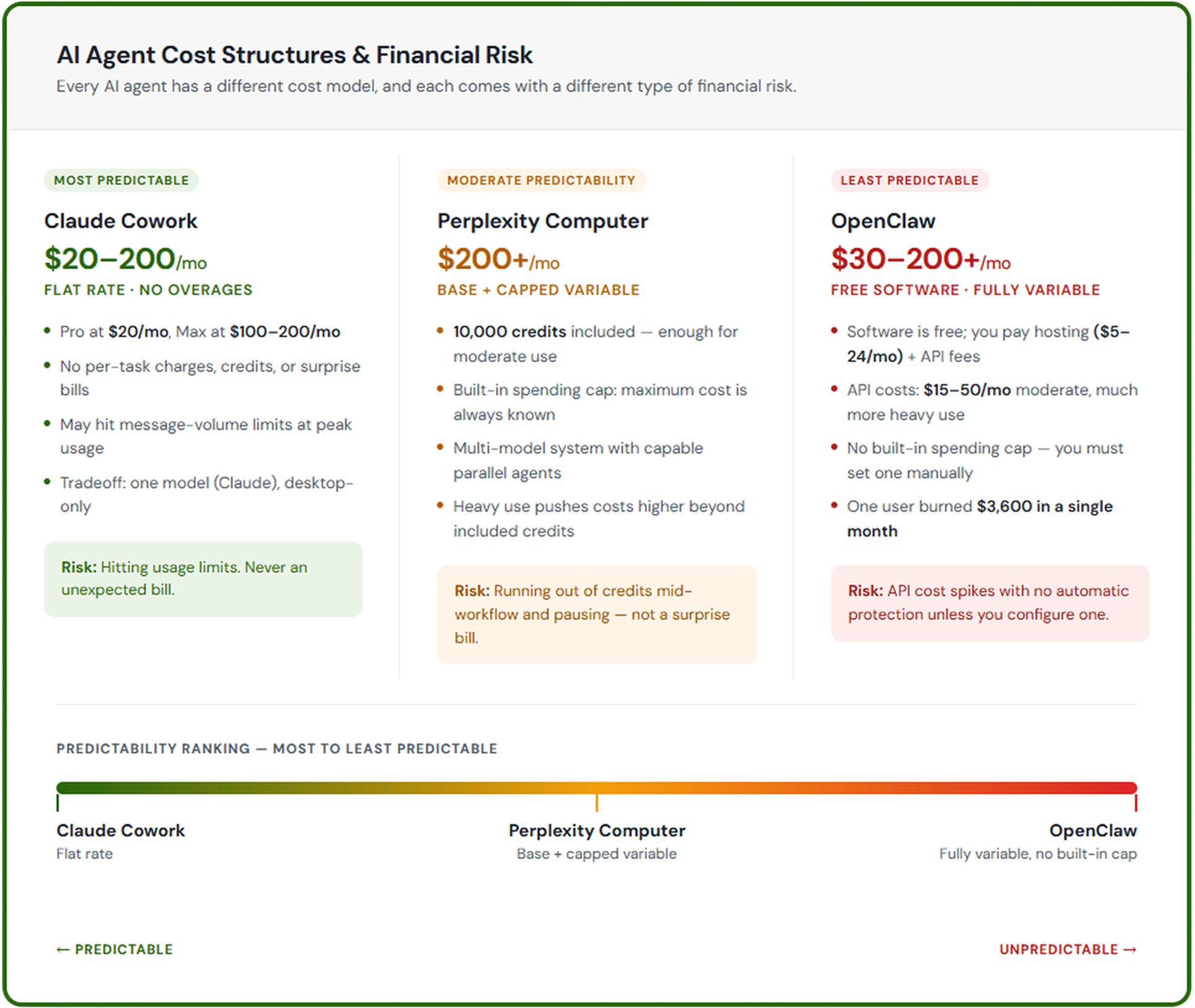
Here’s how the cost structure compares across Perplexity Computer, Claude Cowork, and OpenClaw.
My Experience vs Community
What I shared so far was my experience. But this piece wouldn’t be very useful with only one perspective. And the community is divided:
One Reddit user asked Computer to scan a 280,000-line Python codebase for bugs and fix them. The run lasted about 40 minutes, consumed 15,000 credits before completion, eventually climbed to 21,000 credits, and then burned another 2,000 credits trying to push the result to GitHub
the Awesome Agents review called Computer the most capable multi-model agent available, undercut by opaque credit costs
The Reddit user, Awesome Agents, and I have each run into our own flavor of “wait, that cost how many credits?” moments.
Why Credits ‘‘Disappear’’
Here’s what I found:
Vague Prompts
The multi-model, multi-agent nature of Computer means it tries to handle everything. If we ask for “research this,” “build something cool,” or “make this better,” we are basically paying for the tool to guess.
Being specific about what we want helps save both compute and credits. It’s true for all agentic technologies, not only Computer.
Vague prompts are a very expensive habit.
Looping
Letting Computer run unattended works well for tasks it has already mastered.
For new tasks, especially analysis or code-heavy ones, it’s risky.
I recommend watching it in action and stepping in as soon as you see it struggling.
Failed runs can keep consuming credits on a loop, without clear failure signals.
I was lucky to hit this only once and lightly, whereas Builder.io watched a broken install trigger repeat self-fixes instead of a clean stop. It cost him $200 worth of credits.
Ouch.
Starting big before learning your own burn rate
This sounds obvious.
It is also the easiest rule to ignore when a shiny new tool can do everything.
Computer is new, and the best use of the free credits is learning how it works. Use the early bonus period to learn what your own tasks cost, not just what the product can theoretically do.
Below, I’ll show you how to run a simple experiment to understand your own workflows and develop an intuition for what different kinds of work actually cost.
My Calibration Prompts Experiment
One thing Perplexity does well is show credit consumption as you work. It doesn’t explicitly say “this task cost X,” but you can watch the counter move and infer it.

For example, generating ALT text for the image above cost 31 credits.
That sent me down a rabbit hole.
I analyzed my chat history against credits spent and ran a calibration experiment to turn scattered cost anecdotes into a rough model of my workflows.
First, I designed a few calibration prompts to test the cost of different tasks.
💡A calibration prompt is a deliberate test prompt used to understand how an AI system behaves under specific conditions. Its goal is not to complete a real task, but to measure how the system responds, such as how much it costs, how long it takes, how much context it uses, or how reliably it performs.
Quick reference: In my testing, simple tasks cost under 40 credits, research-heavy tasks cost 50-70 credits, and reusable automations cost 100+ credits.
Here’s a table of the calibration prompts and results so you can repeat the experiment yourself:
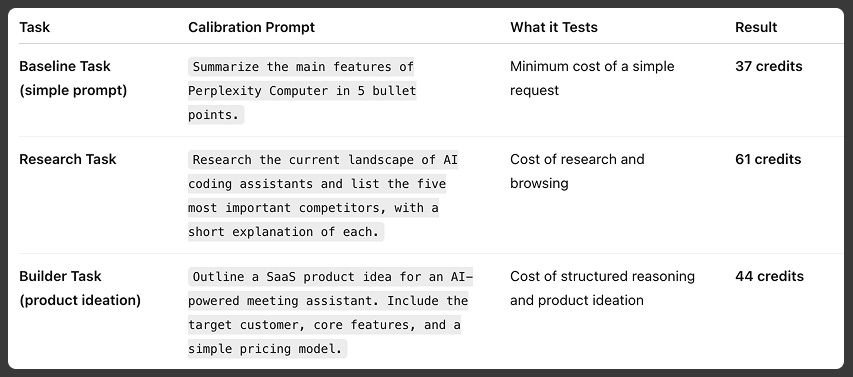
Even in this small sample, research-heavy prompts are noticeably more expensive than generation or structured ideation tasks.
Then things got more interesting: